Copilot Code Reviews for Azure Repos has moved into public preview, which means Azure DevOps teams no longer need to wait behind an early-access gate to try AI-assisted pull request reviews in Azure Repos. Microsoft announced the preview on August 26, 2026, with organization/project/repository controls, Managed DevOps Pools support, custom instructions, automatic review policies, and better cost visibility.
That is useful news, but also the sort of feature that deserves a little admin seatbelt before everyone starts pressing the shiny Copilot button. Automated review is not magic review dust; it is a governance surface. Done well, it can catch routine issues earlier, make pull requests less lonely, and nudge teams toward consistent standards. Done casually, it can become another untagged meter in Cost Management and another policy nobody remembers enabling. Ask me how every “quick pilot” becomes a platform decision wearing a hoodie.

Copilot Code Reviews for Azure Repos: what changed
The practical headline: GitHub Copilot Code Review is now available in public preview for Azure Repos in Azure DevOps Services. According to Microsoft, customers can enable the capability without signing up for early access, although rollout is gradual across regions and may take two to three weeks or longer to reach every organization.
The preview brings several admin-friendly updates:
- Scoped enablement: turn it on at the organization level, delegate to projects, and allow or block repository-level overrides.
- Managed DevOps Pools support: reviews use Azure Pipelines orchestration, and organizations using Managed DevOps Pools can select a managed pool instead of the default Microsoft-hosted option. Microsoft notes that self-hosted agents are not currently supported.
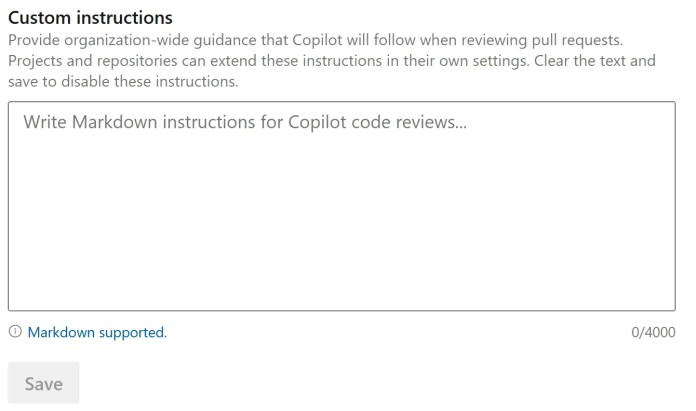
- Custom instructions: define review expectations across organization, project, repository, and path scopes so Copilot checks for the standards your teams actually care about.
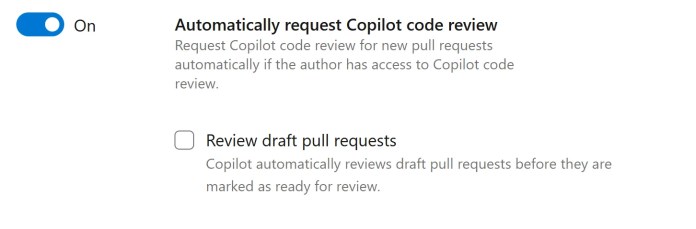
- Automatic reviews: request a Copilot review automatically when a pull request is created, including support for draft pull requests.
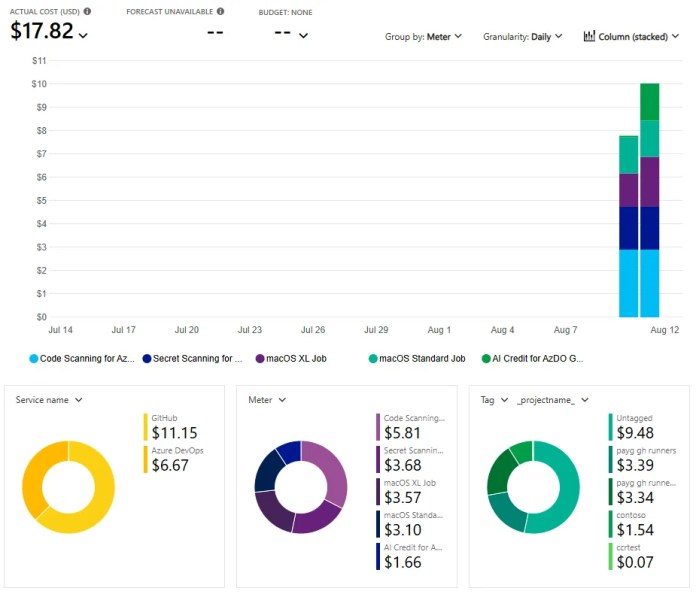
- Cost visibility: Copilot Code Review usage is billed through a linked Azure subscription and can be analyzed in Azure Cost Management, including project-level tags for attribution.
Quick decision card
Adopt now if you already have branch policies, repo ownership, Azure Cost Management budgets, and a standard way to manage coding guidance.
Pilot first if your Azure Repos estate has inconsistent permissions, no cost owner per project, or teams that still treat pull requests as ceremonial paperwork.
Wait if you require self-hosted agents for this workflow or cannot accept preview limitations. Preview means useful, not guaranteed forever.
Why admins should care before developers ask
Pull request reviews are one of those deceptively small processes that shape the whole engineering culture. Azure Repos already supports human reviewers, comments, votes, branch policies, and permissions. Copilot Code Reviews adds a new automated reviewer that can post comments and suggestions on changed code before the human reviewer signs off.
That can be a win for busy teams, especially when comments focus on security, reliability, performance, naming, error handling, or documentation. But it also changes how review signals flow. If Copilot feedback becomes noisy, developers will tune it out. If it catches useful patterns but nobody owns the instruction files, standards will drift. If automatic reviews are enabled everywhere on day one, your Azure bill may conduct a surprise jazz solo.
Admin checklist before enabling Copilot Code Reviews for Azure Repos
| Decision | Recommended starting point | Why it matters |
|---|---|---|
| Enablement scope | Start with one or two active projects, not every repository. | Keeps preview testing measurable and gives teams room to tune review quality. |
| Repository overrides | Allow overrides only where repository owners are clearly defined. | Prevents mystery settings and “who turned this on?” investigations. |
| Automatic review | Use branch-policy targeted automatic reviews for important branches first. | Avoids reviewing every experimental PR while still protecting mainline work. |
| Managed pool | If using Managed DevOps Pools, select a supported pool with latest Ubuntu Server. | Microsoft says Windows images and self-hosted pools are not supported for Copilot Code Reviews. |
| Billing | Create budget alerts filtered to the Copilot Code Review meter and project tags. | Project-level cost reporting helps attribute usage to the teams generating it. |
| Instructions | Create concise organization/project standards, then repository/path-specific rules. | Better instructions produce better comments. Vague guidance produces AI confetti. |
Use custom instructions like policy-as-guidance
Microsoft’s documentation shows that custom instructions can exist at multiple scopes: organization, project, repository, and path. Repository-level guidance can live in .github/copilot-instructions.md or .azuredevops/copilot-instructions.md, while path-scoped files can target patterns such as **/*.ts, **/*.cs, or specific configuration files.
For admins, the trick is to avoid dumping a 40-page engineering standards document into the instruction file. Copilot has to process the guidance during review, so keep it short, specific, and testable. Good examples:
- “Flag hardcoded secrets, connection strings, or tenant IDs.”
- “For API controllers, check authorization attributes and input validation.”
- “For Terraform changes, flag public network exposure unless the exception is documented.”
- “For Power Platform connector code, call out missing retry handling and unsafe logging.”
Microsoft also notes an important behavior: Copilot reads repository-level and path-scoped instruction files from the pull request’s target branch. Changes to instruction files inside the pull request do not affect that same review until merged. That is a nice guardrail because otherwise every questionable PR would come with its own “please ignore questionable PRs” instruction file. Charming, but no.
Automatic reviews need branch policy thinking
Automatic reviews are probably the feature teams will ask for first. Microsoft says Copilot can be requested automatically when a new pull request is created, and this can be configured at the project level or repository level. Repository settings can also target all pull requests or specific branch policies.
My recommendation: start with branch policies for protected branches such as main, release/*, and long-lived integration branches. Leave experimental branches and draft-heavy workflows manual at first. This keeps signal high while the team learns which comments are useful and which instructions need tuning.
Cost controls are not optional
The preview documentation says Copilot code review usage is billed through a linked Azure subscription and appears in Azure Cost Management. Microsoft’s sprint notes also mention project-level cost reporting using Azure DevOps project tags, which means you can filter, group, export, and budget by the team or project driving usage.
Before broad enablement, set a boring-but-beautiful governance baseline:
- Confirm which Azure subscription is linked to the Azure DevOps organization.
- Create a Cost Management view filtered to the Copilot Code Review meter.
- Group by Azure DevOps project tag so teams can see their own usage.
- Create budget alerts for pilot projects before opening the floodgates.
- Review usage after two weeks, because that lines up nicely with Microsoft’s staged rollout window.
A practical rollout plan
Week 1: Enable Copilot Code Reviews for a pilot project. Select two repositories: one high-value service and one ordinary internal application. Add a short instruction file focused on security, reliability, and team conventions.
Week 2: Turn on automatic reviews only for protected branch policies. Watch comment quality, review time, developer sentiment, and cost. Yes, “developer sentiment” is a real metric; it is just usually expressed through memes.
Week 3: Expand to repositories with clear owners. Add path-scoped instructions for high-risk areas such as infrastructure-as-code, auth middleware, database changes, and deployment scripts.
Week 4: Decide whether to standardize project defaults, lock down repository overrides, and document a support path for failed review jobs. Microsoft says PR log links and review effort levels are coming soon, so leave room for policy updates.
What to tell leadership
Copilot Code Reviews for Azure Repos is not a replacement for human review. It is a pre-review assistant that can make human review more focused. The business value is not “AI reviewed our code.” The value is fewer missed basics, faster feedback loops, more consistent standards, and better visibility into where review automation is being used and billed.
For Azure DevOps shops, this is a timely feature worth piloting now. Just treat it like any other platform capability: enable intentionally, measure outcomes, govern cost, and write down the rules before the robots start offering opinions on your pull requests.
Sources
- Microsoft DevBlogs: Copilot Code Reviews for Azure Repos (public preview)
- Microsoft Learn: Get started with Copilot code review for pull requests in Azure Repos
- Microsoft Learn: Configure Copilot code review instructions
- Microsoft Learn: Project-level cost reporting for Copilot Code Reviews
- Microsoft Learn: About pull requests and permissions in Azure Repos
- Microsoft Learn: About permissions and security groups in Azure DevOps
Discover more from SharePoint Monkey
Subscribe to get the latest posts sent to your email.